Help Center
Step-by-step guides below, quick answers further down. Still stuck? Email support@curevista.pk or use in-app support for booking-specific issues.
Booking your first home session
From download to a confirmed booking in a few minutes.
- 1
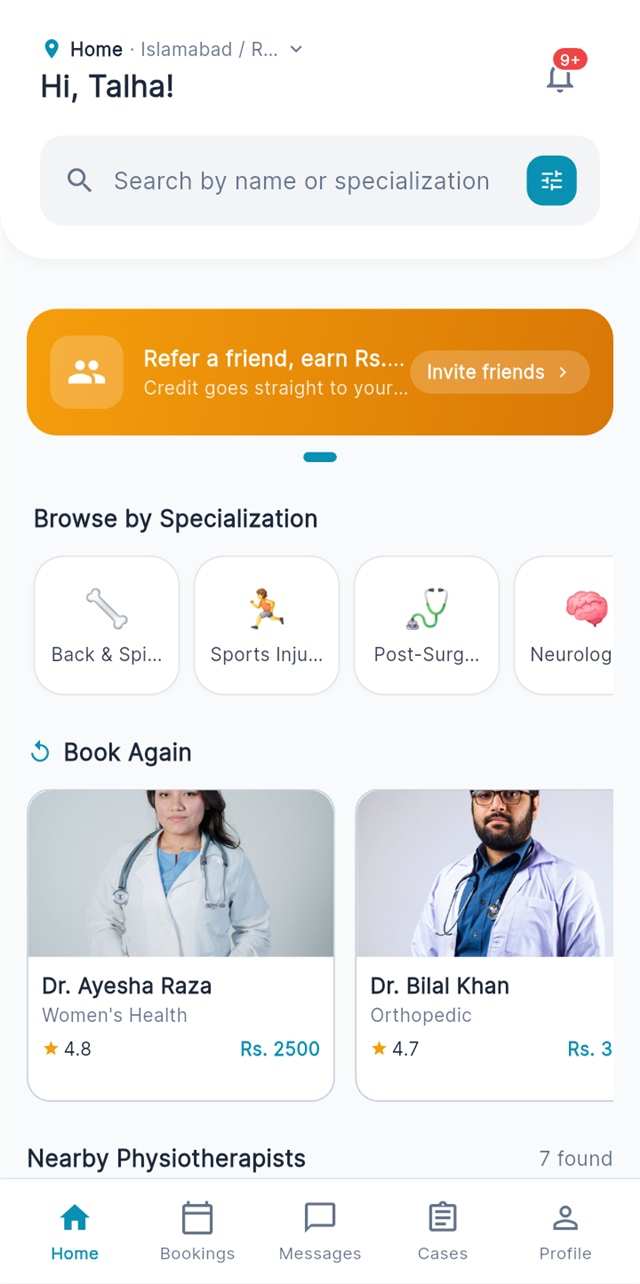
Set your location
Open the app, verify your phone number, and set your home address. You will only see physiotherapists whose service area actually reaches you.
- 2
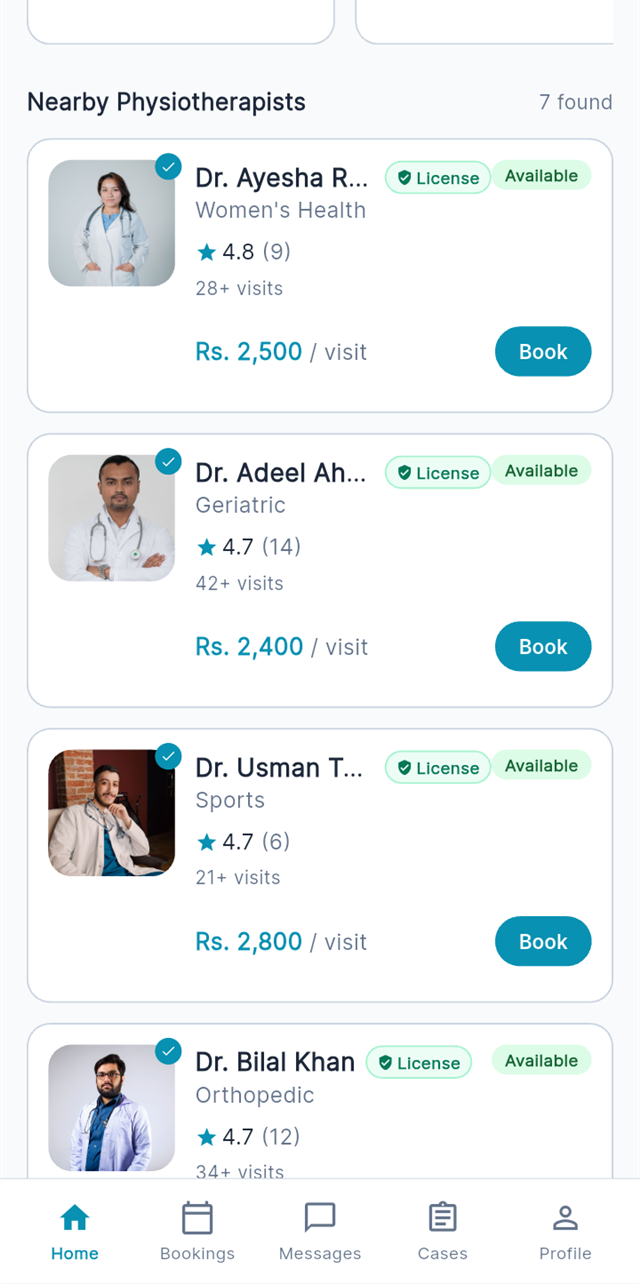
Browse verified physios
Compare experience, specializations, patient reviews and exact fees. The “Verified Professional” badge means license, degree and identity are checked.
- 3
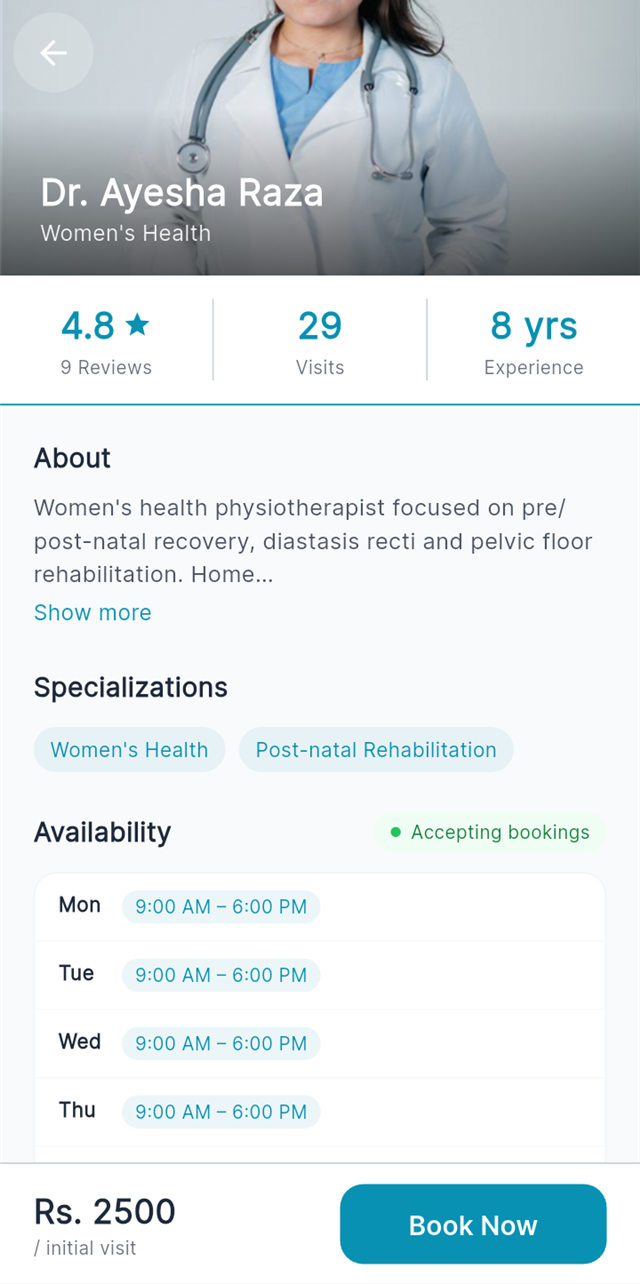
Open a profile
Read the physio’s bio, qualifications and real patient reviews before you decide.
- 4
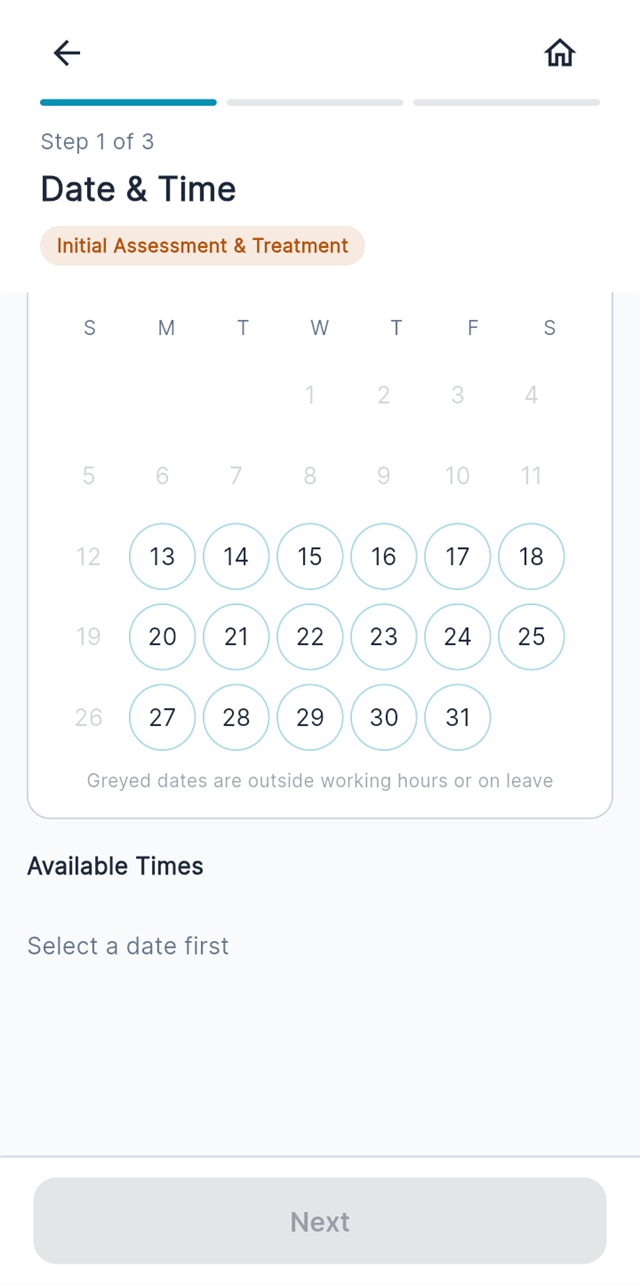
Pick a date & time
Choose from the physio’s live availability — many offer same-day and weekend slots.
- 5
Confirm your address & pay
Confirm where the visit happens, choose a payment method, and you’re booked. The physio gets notified instantly.
On visit day: tracking & chat
Know exactly when your physiotherapist arrives.
- 1
Watch your physio approach
When the physio starts travelling, live tracking shows them on the map heading to your address.
- 2
Chat or call in-app
Gate code? Landmark? Message or call your physio inside the app — your phone number stays private.
- 3
OTP check-in
The session officially starts when the physio enters the check-in code from your app — so you are never billed for a visit that didn’t happen.
Your treatment plan & records
Physiotherapy is a course, not a one-off — the app keeps the whole course in view.
- 1
See your plan
After the first assessment your physio publishes a treatment plan: goals, number of sessions, and what each phase works on.
- 2
Session notes & progress
Every visit adds clinical notes and pain scores, so you (and family members caring for you) can see recovery trend session by session.
- 3
Share records securely
Need to show your doctor? Generate a time-limited share link to your health records from the app.
Payments, packages & refunds
Transparent from booking to receipt.
- 1
Pay per session or per package
Single sessions or discounted multi-session packages — total and per-session price shown before you commit.
- 2
Bank transfer supported
Pay by bank transfer and upload the proof in-app; your booking confirms as soon as it’s verified.
- 3
Wallet & refunds
If a paid session can’t be delivered, the amount returns to your CureVista wallet automatically. Receipts are downloadable per session.
Quick answers
Bookings & sessions
How do I book a session? +
Open the CureVista app, browse physiotherapists near you, choose a date and time, confirm your address, and pay via your selected method. Your physio arrives at the scheduled time.
Can I reschedule or cancel a booking? +
Yes — from the booking detail screen in the app. Rescheduling is free with reasonable notice; cancellation close to the appointment may carry a fee (shown before you confirm), which compensates the physiotherapist for the reserved slot.
What if the physiotherapist doesn’t show up? +
Report a no-show from the booking screen in the app. Our team investigates every report; you are never charged for a session that didn’t happen.
Can I book for a family member? +
Absolutely — many bookings are made by children for parents. Set the patient details and address during booking; you can track everything from your account.
Payments & refunds
How do I pay? +
Pay per session or per package through the payment methods offered in the app, including bank transfer with proof upload. Fees are always shown upfront.
Are there hidden charges? +
No. The fee you see on the physiotherapist’s profile is the full fee for a home visit. Packages show total and per-session pricing before you commit.
How do refunds work? +
If a paid session can’t be delivered, the amount is returned to your CureVista wallet (or original payment method where applicable). Contact support from the app for help with any payment issue.
Trust & safety
How are physiotherapists verified? +
Every physiotherapist submits their degree, professional license and CNIC. Our team verifies the documents before the profile can accept bookings — look for the “Verified Professional” badge.
Is my medical information private? +
Yes. Your health records, session notes and documents are visible only to you and the physiotherapists treating you. See our Privacy Policy for full details.
How do reviews work? +
Only patients who completed a session can rate and review — so every review you read reflects a real home visit.
Book your first home visit today
Download the CureVista app, browse verified physiotherapists near you, and book a home session in under two minutes.

Free on Google Play · iOS coming soon